Replacing the Boost Radio in my 2003 R53 MINI Cooper S
A lesson in signal frequency management
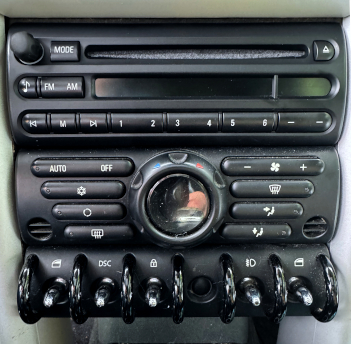
R53 Center Stack
05/15/2065
The Boost radio in my 2003 MINI Cooper S croaked on me a while ago. Or, more accurately, my Boost radio's CD player croaked on me. But let's be clear: it wasn't the Boost radio's fault. I was having electrical problems with the car and came out one morning to find the sunroof open by a couple of inches with the car on a downslope... in the rain. Nice. That meant that the rain landed on the panel of the Boost. When I turned on the key, the Boost's first considered move was to throw up the CD, which, while sticking out, funneled all the rain right into the CD slot before I could get the sunroof closed. I quickly turn off the radio and dried everything off as well as I could, but it was too late. Once I let it dry out and tried it out, only the radio tuner worked. The unit would feed and control the car's external, trunk-mounted OEM Harman Kardon DSP unit, however. There was that.
So, after asking some questions around the Internet, I recently decided to replace the Boost. I was assured that any boost would control the Harmon Kardon. But let's get this straight, right out front: I am not a a neo-Luddite. I work in high-tech all day. Nevertheless, my goal was to replace the ailing 2003 Original Equipment Manufacturer (Alpine) Boost radio/CD with an exact replacement. Nuthin' fancy. Just a Boost. Yes, I know, many people consider CDs outdated and consider streaming the only way to go, but there are good and sufficient reasons for my decision:
1. The Boost head controls the excellent Harmon Kardon DSP system that features DSP and multiple amps and speakers. I'm not sure any other can.
2. I am a recording engineer and producer. The easiest way for me to transport a song from the studio out to the car in the parking lot to listen is still via burning a CD. Yes, it still is. After twenty-three years I am used to the sound of this audio system. But who knows? I might just buy a Bluetooth adapter unit for the car later so I can use my phone.
3. In general, OEM units are far less attractive to thieves than fancy up-to-date units and are thus are less likely to be stolen. I've been through car audio theft more than once and have no further interest in it.
4. I like the look of the OEM unit. It matches the highly styled MINI Cooper interior.
5. My commute is so short that taking the time to choose music on my phone is ridiculous. I get to hear perhaps one song before I arrive at work. I simply keep a good CD in the slot and let it fill the space until I tire of it.
While looking for a replacement unit, I found an online store that specializes in refurbishing and selling German auto electronics. I ordered an exact replacement from them. The dealership is a brick and mortar affair that seems trustworthy enough and the replacement arrived in wonderful condition. Before attacking the car, I watched a bunch of YouTube videos about removing the old unit so I felt somewhat prepared. Somewhat. Of course, things never turn out as you plan or as easy as the videos represent. The radio arrived looking brand new. Yay! The first thing I did was to take out a pad and pencil to the car and write down all my memorized radio stations from the old radio. Then I took a bundle of tools out to the car and began "demolition". I didn't get very far. For this job, the first task involved in removing the flashing around the radio is to remove the four screws that hold the center console down. Two are in the cupholders and two are under the side view mirror adjustment panel at the back of the center console. Just pop up the shift boot ring, they said, reach back under, and pop up that little panel. Nope. Nope. Nope.
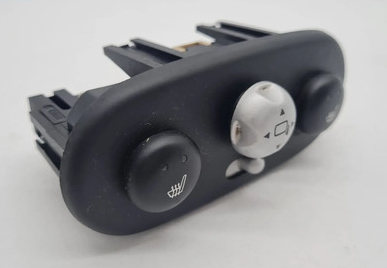
Every video that I watched was performed in a car that didn't have heated seats. In a car like mine with heated seats, the heated seat controls are on that same panel as the mirror adjuster. There is a support bulkhead added into the center console that bolsters the panel but prevents access to it from underneath. That means it must be taken out from the top. I pulled out a putty knife and my body panel removal tools and set to. First the little panel cover popped right off, gaily shooting the various switch caps all over the cabin. The mirror joystick cap ended up somewhere in the gap between the seat and hump, of course. Add ten minutes of searching and recovery right there. Underneath that little trim panel was the block holding all the switches. With a little gentle prying up it came, revealing the two desired screws underneath.
Great. Done. Time to unscrew the two tubes flanking the radio. Rut-roh. It wants a T40 Torx. My biggest is T32. That caused a forty-minute trip to the hardware store. Isn't that the way it always works? Once back in the car I dropped down the knee bolster around the steering wheel (harder than it looks) and the glove compartment door, and unscrewed the four Torx screws. Easy. Then it was time to wrestle the trim tubes out from each side of the center stack (harder than it looks). Videos say the radio itself is held in by four Phillips head screws. Nope, Torx, but I did have this sized bit. Once they are gone, place a towel where you are going to put the raidio and simply pry out the radio. Uh-huh. Use a screwdriver behind the space on each side between the two screw hole tabs (not on the tabs proper-the surrounbd is all lightweight plastic). Done.
From there it was removing the antenna wire, the multiway cable connector and the little black cap that secures the strain relief to the back of the radio. There is a lever on the back of the multiway connector. Swing it out of the way and pull out the connector. Finally, remove the antenna connector. There's a little latch on the side that no-one talks about. Push the latch in and slide out the connector. Now connect the new unit. Once the electronics are connected, function test the unit. Check. Glorious. Now reverse the steps to put everything back together.
Finally, sit back, stuff a favorite CD in the slot, and crank her up. Success!!! The Boost radio immediately recognized the Harmon Kardon package and took control. You'll need to re-learn all your radio channels using your list, but that will also allow you to reorganize them if you wish. Now, you can bask in your little technical accomplishment!
= =
=